
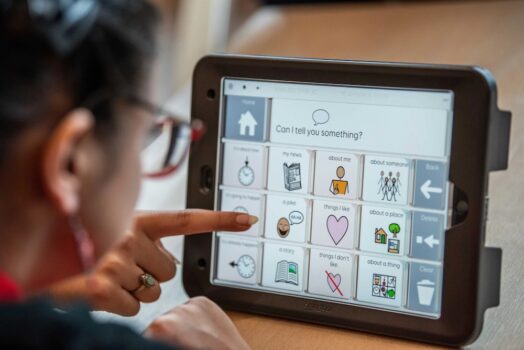
In this article, we showcase 3 Augmentative and Alternative Communication (AAC) Apps currently on the market. Our Speech & Language Therapists have experience of using all three and find these tend to be recommended amongst professionals in Norfolk and Suffolk. All three are good at adapting and personalising to meet individual needs.
It is important to stress that AAC Apps are not an independent solution and should always be part of a wider speech and language therapy plan. We would always advise consulting with a Speech & Language Therapist (SLT) to ensure the best AAC match for each individual’s communication needs.
Trust the Experts
Choosing the right AAC App depends on specific user needs, literacy levels, and access requirements. However, knowing how to introduce AAC and how to use it on a daily basis is as important if not more important than which App you pick. You can have the best system ever but if the family is nervous about using it and the patient doesn’t see it being used around them all the time, then success will be limited.
It’s important for families to have a detailed discussion with an SLT before deciding on which one to get. We can guide you through;
User Needs and Abilities
- Cognitive level: Can the user understand symbols, categories, and navigation?
- Language level: Do they need access to single words, phrases or able to communicate using full sentences?
- Literacy: Do they read and spell? Do they need symbol-based access?
- Motor & visual skills: Can they tap small buttons or swipe? Do they need switch access, eye tracking or head pointing? Can they visually access the whole screen? Do they require bnigger buttons or different colours?
App Features
- Symbol sets: Does it use a familiar or flexible symbol system like PCS, Widgit, SymbolStix, or custom images?
- Text-to-speech: Quality of voice, language options, Intonation, naturalness, gender/age representation.
- Customisation: Can you easily add words, photos, recordable voice, video clips and categories or rearrange layouts?
- Vocabulary: Does the app have access to core (high frequency) and fringe (specific nouns/verbs) vocabulary?
- Access methods: Touchscreen, switches, eye gaze, head tracking.
- Keyboard: Does the app have access to a keyboard – ABC or Qwerty?
- Multilingual support: Important if the user communicates in more than one language.
- Offline use: Works without internet? Useful for school and travel.
- Back up data: To ensure personalised vocabulary and settings can be quickly restored if the device is lost, damaged, or replaced.
Design and Interface
- Ease of use: Is it intuitive? Is there too much going on?
- Visual layout: Grid size, button size, colour coding.
- Navigation: Can users return to the home screen easily? Is it overwhelming?
- Voice output speed: Can it be adjusted?
- Smart Device: Picking the right App for your device – Android or Apple (iOS).
Offline Practicalities
- Education provider: Is the App supported by your child’s school?
- Healthcare provider: Is the App compatible with your Local NHS?
It takes time to successfully use Augmentative and Alternative Communication (AAC), sadly, far too often we see AAC not being used properly, which ends in frustration, disappointment and abandonement.
Let’s Break It Down
You may be eligible for funding for an AAC App subscription. Various funding sources exist, including the NHS, local AAC services and charitable organisations, however these vary from region to region. If you live in the East of England we recommend you get in touch with;
Communication Aid Service East of England (CASEE).
Suffolk Communication Aids Resource Centre (SCARC)
Access Through Technology Norfolk (ATT)
1. Grid for iPad / Grid 3 (Windows)

Key Features:
- Symbol or text-based
- Excellent support for switch access, eye tracking (with compatible devices)
- Includes accessible apps (email, texting, environmental control)
- Custom vocabulary grid sets such as Super Core 50 and Voco Chat
- Extensive template library
- Can access and develop other communication systems such as social stories and visual timetables
- Alphabet Access
- UK based vocabulary and cultural references.
- Uses Widgit symbols which are commonly used in schools. Access to games, books and other features such as timers, clock and Alexa.
Cost: Grid for iPad is £9.99 a month on subscription or £299.99 for a full licence. They offer a 30 day free trial period. Grid for Windows starts at £550.00 for a single user license and they offer a 60 day trial period.
Further information: thinksmartbox.com
2. Proloquo2Go

Key Features:
- Well designed vocabulary system with core words on every page for easy access and motor planning
- Lots of options for grid size and layout
- Great for users developing grammar and full sentences
- Templates for new pages
- Can add photos and voice recordings
- Voice output with multiple natural-sounding voices
- Works on iOS only
- Alphabet Access – can’t easily access Qwerty
Cost: A one time purchase of £249.99 to download the app.
Further Information: assistiveware.com

Key features:
- Different vocabulary sets including ‘Snap and Core’ and ‘Snap Express’
- Uses PCS (Picture Communication Symbols) which is an American Symbol Set
- Works with touch, switch, and eye gaze
- Available on iOS and Tobii devices
- Alphabet Access
- Quickfire Messages pre loaded with lots of functional phrases and questions
Cost: The core TD Snap App is free to download and use. The Speaking Feature Subscription is £9.99 a month and is required to unlock the speaking function. Additional subscriptions are available for features like Gateway and PODD, at £4.99 per month. It is possible to borrow a device direct from Tobii Dynavox for up to 2 weeks. This is a good way to try a device before committing to it.
Further Information: tobiidynavox.com
Get The Right Support
It’s good to review the different Augmentative and Alternative Communication Apps on the market, but to get the best long-term results, you should always consult a Speech & Language Therapist. This way you’ll get the right AAC App for your needs and crucially get necessary support that is needed to implement AAC into your lives effectively.